11 Ways an LMS Supports Students, Educators, and Districts
Your edtech shouldn’t feel like the main character in a classroom. A learning management system (LMS) that distracts, lags, and just serves as a document hub will continually steal attention from teachers, students, and leaders.
But an LMS that connects your digital ecosystem, gives teachers efficient tools to gather and act on data, bridges classrooms to families, and safeguards learners in every kind of learning environment? That’s the kind of edtech that fades into the background so educators can teach and students can learn.
Here are eleven ways an effective LMS supports learning, teaching, and everything in between.
1. A familiar, reliable digital classroom
Learning rarely happens under “ideal” conditions. Student schedules change, teachers need substitutes, and class assignments change from year to year. An LMS can be the familiar digital environment that students and educators know and understand, no matter what the year throws at them.
A high-quality LMS creates a home base. It’s easy to navigate, find assignments, give feedback, and communicate. When students and educators know where to find what they need—regardless of which classroom they’re in—learning stays consistent. Face-to-face, blended, and fully online instruction all avoid disruptions with Canvas LMS.
2. Designed for engagement over assignment completion
Clicking doesn’t equate to engagement. An LMS supports deeper student engagement by giving students multiple ways to interact with content and their teachers. Discussions, multimedia assignments, voice notes, self-assessment, and interactive learning experiences encourage them to think critically and contribute in relevant and accessible ways.
Engagement should always be purposeful. When learning activities are clearly organized, everyone knows what to expect. Feedback is easy to find and students can focus on what they’re learning (or what they’re learning about their learning) instead of figuring out what they’re supposed to do next. An LMS should offer the opportunity to blend engagement and learning for every student, everywhere.
3. Differentiated learning at your fingertips
Students bring different needs and strengths into the classroom. An LMS gives educators flexible ways to structure learning while maintaining a consistent experience for all students.
With clear organization and shared expectations, students can move through content at a pace that works for them and revisit materials as needed. They can also better understand where they are in their learning journey, whether in a specific assignment or unit.
Differentiated learning works when flexibility doesn’t create fragmentation. Canvas LMS helps schools balance flexibility with features like Mastery Pathways, Differentiation Tags, and flexible assignment dates, which support equity and long-term instructional goals, regardless of the classroom, course, or learning environment.
With Canvas, we have the ability to reach more students, individualize our instruction more, and differentiate. It makes it easier to manage and do all those tasks.
- Alexandra Griffith, English Teacher, Oshkosh Area School District
4. Options to assess learning
Assessment plays a critical role in helping students understand what they know and what they still need to learn. An LMS should provide assessment experiences that are both flexible and clear. Teachers have options in how to assess, and students can show their understanding in different ways. Clear expectations and consistent structures can reduce anxiety and help students engage more confidently with assessments, whether they’re formative check-ins or larger evaluations.
When assessment is a part of the learning process, it becomes more meaningful for students and more useful for educators. Canvas LMS gives options for securely assessing student learning, like Quizzes or formative check-ins. Plus, it provides access to progress that families can view.
Part of what makes Canvas LMS so usable is being able to automatically grade questions or quizzes and sync to [our SIS].
- Kevin Hand, Middle School Teacher, Spartanburg 2
5. Helpful and intentional feedback
Feedback is only useful when students can find, understand, and use it. An LMS brings feedback into the learning flow so students can see how they’re doing and what they can do next.
Instead of lugging around stacks of check-ins, tests, or essays, teachers can house feedback in a single, digital hub (that never gets tossed in the trash on the way out of class!). And when feedback is timely and connected to assignments and assessments, students can build confidence and track their progress over time instead of treating each assignment as a disconnected moment.
Clear and accessible feedback also strengthens communication between educators, students, and families. An LMS creates a shared understanding of learning goals and growth by keeping feedback and progress visible in one place.
6. Learning beyond the classroom
Families often want to support their children’s learning at home, but don’t know how or where to start. An LMS extends learning beyond the classroom and gives families visibility into assignments, expectations, and feedback. When families see what students are working on and how they’re doing, it’s easier to have conversations at home. Without last-minute surprises or secondhand updates from students, parents and guardians stay connected through an LMS without adding pressure.
By creating role-based access to learning information, an LMS like Canvas builds trust and communication between schools and families. Everyone stays in the loop, families have a better understanding of how to help their students, and students benefit from a more connected learning community.
Being able to find all of my children's school work and class information in one place [Canvas LMS] has made it much easier to support my kids in their learning.
- Parent, Poway Unified School District
7. Mobile-first access
Equity matters more than ever. Students learn at different paces and in different places. A mobile-first LMS creates more equitable learning experiences by giving every student consistent access to coursework and materials, wherever they learn.
Students can review lessons, submit assignments, check feedback, and see notifications from their teachers when an LMS acts as a single digital hub. Plus, Canvas App’s new offline mode ensures students have access to their course material, regardless of their internet connectivity. This flexibility matters for students who share devices, rely on mobile access, or need additional time and space to engage with learning. Regardless of a student’s circumstances, an LMS is one tool a district or school can use to support every student, everywhere.
8. Open ecosystems and easy integrations
Technology leaders are responsible for keeping learning systems connected and secure. An LMS with strong integrations can serve as the central hub of a district’s edtech ecosystem. Tech leaders manage fewer disparate systems while students and educators avoid juggling multiple logins or disconnected workflows. Learning tools fit into what teachers already use, reducing friction and saving time across classrooms.
Districts need interoperability instead of siloed tools. Canvas LMS supports standards-based integrations and allows schools to adopt tools and scale initiatives without disrupting teaching and learning. Systems work together, and technology supports instruction quietly and reliably.
9. Data you can do something with
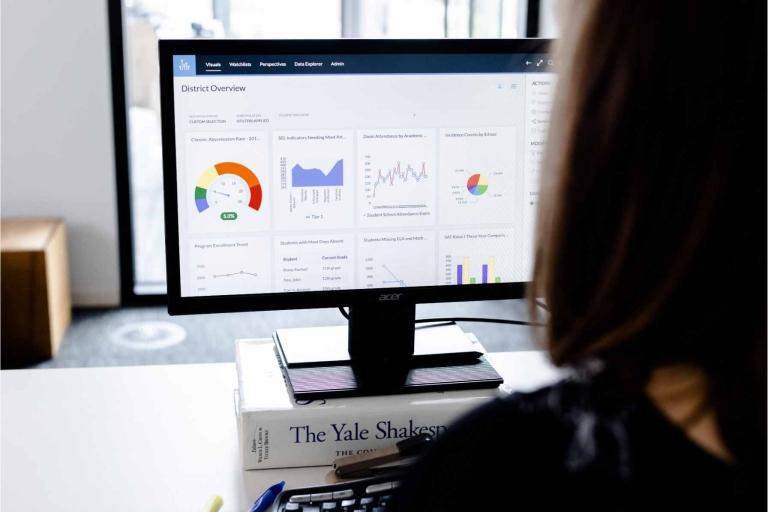
Connected systems give schools efficiency and visibility. An LMS brings engagement and progress into one place, making it easier for educators and leaders to see what’s happening without pulling reports from multiple tools.
Instead of manually gathering that data, educators easily access usage data. Teachers and administrators can see patterns in usage or disengagement in Canvas LMS and support students before small issues become bigger ones—supporting the whole student. Usage data can also show district leaders underused tools or where staff would benefit from professional learning. Because an LMS grows in effectiveness as the entire learning community embraces it.
The students who are the least engaged in Canvas are almost always the ones struggling the most academically.
- Kim Burlinson, Biology Teacher, Los Gatos High School
10. Secure for every user
If student data isn’t protected, the LMS loses all credibility. Strong security and clear role-based access help districts balance transparency with responsibility.
With defined permissions, students, educators, administrators, and families each see the information that’s relevant to them—and nothing more. This reduces risk, supports compliance, and builds trust across the learning community.
Just as importantly, security should never get in the way of teaching and learning. A well-designed LMS keeps data protected in the background while instruction and communication move forward.
11. Future-ready
Education evolves. Students evolve. And so should your LMS. New instructional approaches and shifting policies shape teaching and learning at a high level, and an LMS should bring those to a practical level for teachers and students.
‘AI-powered’ shows up on nearly every tech tool today. How can districts thoughtfully innovate with AI and decide which tools are actually useful and secure? IgniteAI in Canvas, for example, maintains guardrails by preserving educator judgment and protecting student data. The payoff, though, is in-context support for teachers to elevate assignments, give feedback, or create new ways to assess more efficiently. That’s LMS evolution in real-time.
An LMS should earn trust across the learning community
An intentionally designed LMS supports learning without getting in the way. It creates consistency and clarity for everyone in the learning community: students, staff, families, and leaders.
The right LMS doesn’t demand attention with outdated features, a lack of student data security, or frustrating user experiences for teachers and learners. It earns trust. And that trust gives schools the space to bring students and teachers back to center stage.